Order book heatmaps: reading resting liquidity, walls and pulls
How to read an order book heatmap, also called a liquidity heatmap: what the colours show, walls that hold, are pulled or refill, what it cannot show, and a free one for crypto perps.
An order book heatmap draws the limit orders resting in the order book at every price, over time. Each row is a price, time runs left to right, and the colour shows how much was resting there: dark for little, bright for a lot. Executed trades are drawn on top, so you can see price moving through the liquidity. Traders also call it a liquidity heatmap or a depth heatmap.
Heatmap trading means using this view to follow resting liquidity alongside executed trades. A candle chart shows where price went. An order book heatmap shows what was waiting for it: where buyers and sellers had placed orders, which of those orders stayed, and which disappeared before price arrived.
Open one live: EdgeDepth’s order book heatmap is free all day on Binance Futures BTCUSDT. Open the terminal and pick Real-time beside the timeframes, or open a recorded replay with no sign-up.
How to read an order book heatmap
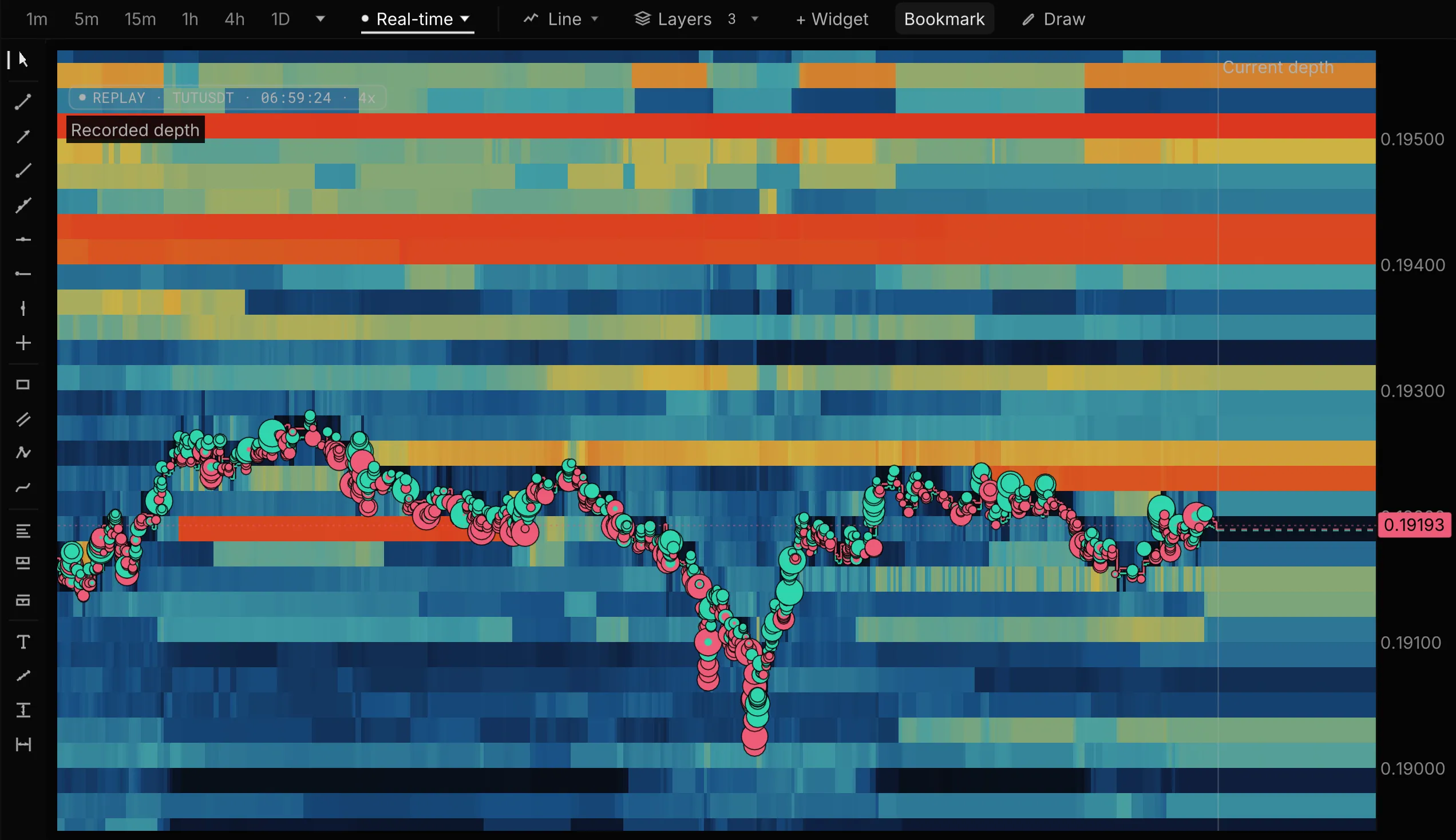
- Rows are prices, columns are moments. Read a band from left to right to see how long an order stayed at that price.
- Colour is size. Dark blue means little resting there; yellow, orange and red mean progressively more. By default EdgeDepth’s scale follows the book in view, so compare bands with each other, not with yesterday’s chart.
- Above price are asks, below are bids. Asks are sell orders waiting to be bought from; bids are buy orders waiting to be sold into. As price moves, a band that was above it can end up below it.
- Bubbles are trades. Each one is an executed trade at its price and time, sized by value: green when the buyer was the aggressor, red when the seller was. See trade bubbles.
- The right edge is the book now. Everything to its left is history: what the book looked like at each moment, not what it looks like today.
In the TUT chart above, two bright bands of asks near 0.1940 and 0.1950 stood for the whole window and price never went near them. Just above 0.1920, price rose into a band twice on the right side of the chart and turned back both times while the band stayed bright. Near 0.1919 a bright band ran along the price for a while, then ended. From the heatmap alone you cannot tell whether those orders were filled or cancelled. The trades at that price decide it, which is the next section.
Heatmap trading: what traders look for
Start with a bright band near price and follow it through time. Does a wall stay as price approaches, disappear before trades reach it, or refill while trades keep hitting it? Absorption describes trades meeting replenishing liquidity with little price progress. Brightness alone cannot establish it.
Compare the band with the prints, then watch what happens next. The useful record is the sequence of resting size, trades and price movement, not a bright level treated as a promise. The three examples below show what to look for.
Walls that hold, walls that are pulled, walls that refill
A wall is a band much brighter than its neighbours: a lot of size resting at one price. What matters is what it does when price gets close.
It holds. Price trades into the wall, trades print at that price, and price turns back while the band stays bright. Someone was willing to absorb the aggressive orders there.
It is pulled. The band disappears before price reaches it, and no trades print at that price. The orders were cancelled. A wall that only exists until price gets close was never going to stop it.
It refills. Trades keep hitting the same price, the resting size dims, then comes back again and again. More size was there than the book ever showed at once: an iceberg order, or a trader topping the level up. Refill levels mark icebergs and absorption: prices where aggressive orders kept meeting liquidity that refilled.
To tell a fill from a pull, look at the trades at that price when the band ends. Large trades printing there means the orders were filled. Nothing printing there means they were cancelled.
Is a pulled wall spoofing?
Not on its own. Spoofing means placing orders you intend to cancel, to make others trade, and intent is not visible in the data. Traders cancel orders for ordinary reasons too: price moved, their view changed, they moved the order to another price. A wall that appears and vanishes repeatedly, always just ahead of price, is worth noticing. It is still a reading, not proof.
What an order book heatmap cannot show
- Hidden size. An iceberg shows only part of its size at a time. The refill pattern is the clue, not the band’s brightness.
- Stops and liquidations. Stop orders and liquidation prices are not in the public book until they trigger. For those, see the liquidation heatmap.
- Other exchanges. Crypto liquidity is split across venues. A heatmap of one exchange’s book shows that exchange; a wall on Binance says nothing about Bybit’s book at the same price.
- Every level, every moment. Books are recorded to a depth and drawn at a resolution. Brighter bands show more sampled resting depth. Orders can change or cancel before trading. Hyperliquid publishes 20 levels each side, so its heatmap stops closer to price than a full Binance book.
- Why orders were placed. A wall shows size, not intent or what happens next.
Order book heatmap, DOM, footprint or liquidation heatmap?
| Chart | Shows | Best for |
|---|---|---|
| Order book heatmap | Resting limit orders at every price, through time | Where liquidity built up, held or was pulled |
| DOM and tape | The book and trades right now, as numbers | Exact sizes and the queue at each price |
| Footprint chart | Volume bought and sold at each price inside each candle | Who was aggressive and where |
| Liquidation heatmap | Prices where leveraged positions would be forced closed | Where forced orders could arrive |
The heatmap and the DOM read the same book: the DOM is one moment as numbers, the heatmap is the history of those numbers as colour.
Watch it in replay
The reason to record the book is to come back to it. In a replay you can pause at the moment a wall vanished, step back a few seconds, and check whether trades hit it first. EdgeDepth records the order book itself, tick by tick, so a move can be replayed with the book as it was, not as it looks now.
The same GTC/USDT pump from the liquidation heatmap guide, seen in the book:
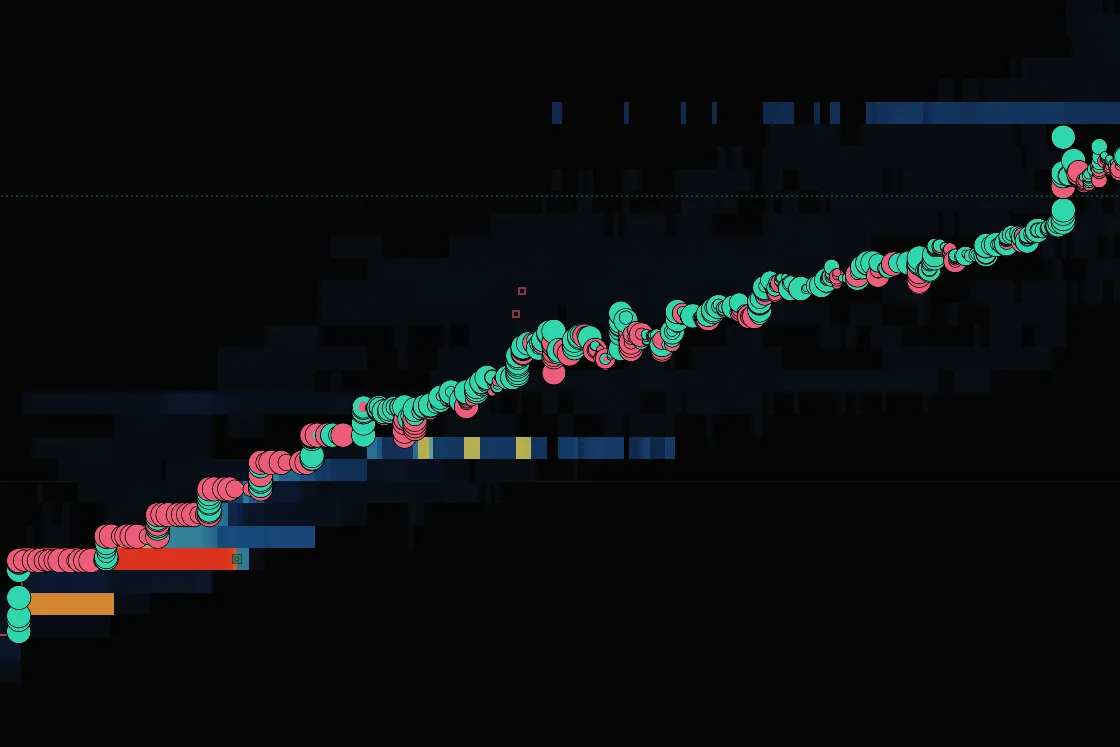
Price left the bright orders near 0.17 and 0.18 behind and climbed to about 0.28 in about twenty seconds. Above the climb the book was dim: little stood in the way. Open the move in the event archive to replay it, or read how to start a replay.
Order-book replay covers the last 30 days on Pro and 90 on Research; older days stay searchable, and archived moves keep their full replay. On a free account you can replay the past 3 days of BTCUSDT and any archived move from the past 7 days, with the book, trades, candles and depth heatmap.
Order book heatmap questions
What is heatmap trading?
Heatmap trading means reading liquidity through time alongside executed trades. With an order book heatmap, traders look for walls that stay, are pulled or refill, and whether trades are absorbed at those levels. It helps describe how a move happened; it does not guarantee where price goes next. A liquidation heatmap shows a different kind of liquidity, so check which data the chart uses.
Liquidity heatmap or liquidation heatmap?
Different charts. A liquidity heatmap, the one on this page, draws limit orders traders placed on purpose. A liquidation heatmap marks the prices where leveraged positions would be forced closed, which are not in the book until they trigger. A search for “BTC heatmap” can mean either.
Can order book walls be faked?
Yes, in the sense that orders can be cancelled at any time, so a wall can vanish before price reaches it. That is why the useful question is what the wall did when price arrived: held, was filled, was pulled, or refilled. See walls that hold, walls that are pulled, walls that refill.
Is there a free order book heatmap for crypto?
Yes. EdgeDepth’s Real-time mode is free all day on Binance Futures BTCUSDT, and recorded replays open it for everyone. Other live markets get a short daily preview, and all day on Pro. The open-source terminal draws depth heatmaps too, on your own machine with no account.
Why do walls disappear when price gets close?
Either they were filled or they were cancelled. Check the trades at that price as the band ends: prints mean a fill, no prints mean a pull.
Which exchange’s book am I looking at?
One exchange and one market at a time: the market named on the chart. EdgeDepth records Binance USDT-M, Hyperliquid and Bybit perpetuals; each book is that venue’s own.
What does the colour scale mean?
Brighter means more size resting at that price. By default the scale follows the book in view, measured every couple of seconds, so scrolling to a busier stretch changes what counts as bright. Read bands against their neighbours.
Looking for a calculation? Open the Reading library. For recorded exercises, browse guided lessons.